
Priority Updates
We have added Priority Updates to announce changes and new features. You won’t have to look for them. They will show up when you need them. We hope they are helpful to you so that you can enjoy and utilize all that My Lesson Planner has to offer. Let us know how you like this
- Published in News, Uncategorized
New Lesson Block Editing Icon
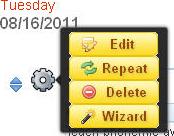
We have just added a new feature to My Lesson Planner that cleans up the left margin area of your lesson and information blocks. Just mouse over the small knob icon and you will see all of your other editing icons. The click and drag arrows are beside the editing icon so you can still
- Published in News, Uncategorized
CCSS Updates
The CCSS standards have been updated to show the format most commonly seen when referencing the Common Core Standards. (Ex: Math OA.5.1, Math.G.CO.1, English W.5.1a) If you can’t see the CCSS standards, make sure your Preferences show you have marked National Standards to show. Then click on NS, then CCSS, and you will see your
- Published in News