

Printing Your Lesson Plans
My Lesson Planner is very aware of the needs of teachers, and as much as we like it "green," we realize there are needs and situations requiring you to print lesson plans. We spent the time to get it right and made sure that printing your lessons is as easy as point and click.
Printing Your Lesson Plans
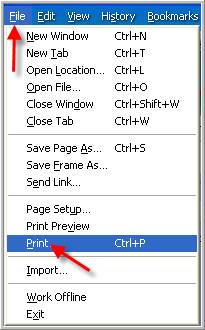
Since our software is web-based, printing works just like you would print any page off the internet. Just go to File, and print preview, and print. If your margins need to be adjusted, you can change them under File, Page Set-Up.
If you need to conserve color ink, your printer
properties can be adjusted to print in black and white.
If your printer properties have been adjusted to print in color, and the document will not print in color,
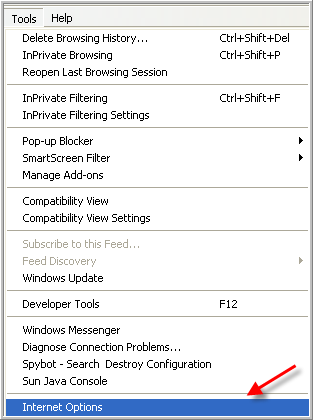
you will need to change your Internet browser settings. On your browser toolbar, click on "Tools" and
then "Internet Options."
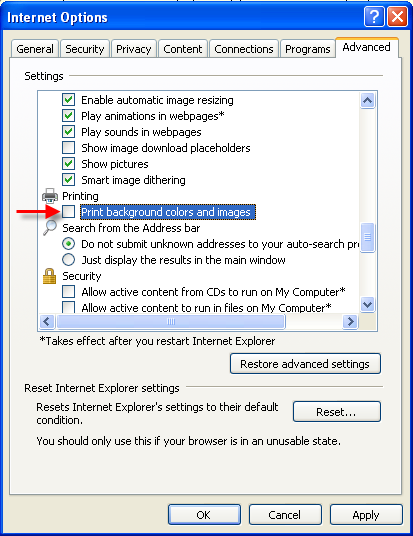
On the Internet Options pop-up window, click on the "Advanced" tab. Scroll down until you find
"Printing," and click on the box next to "Print background colors and images."
You will need to close your browser window, and restart your Internet browser for the change to take
effect. Your log in will remain current after reopening the browser. If you continue to have difficulty, or
if you need instructions for a browser other than Internet Explorer 8, contact us.